Your passwords,
your device.

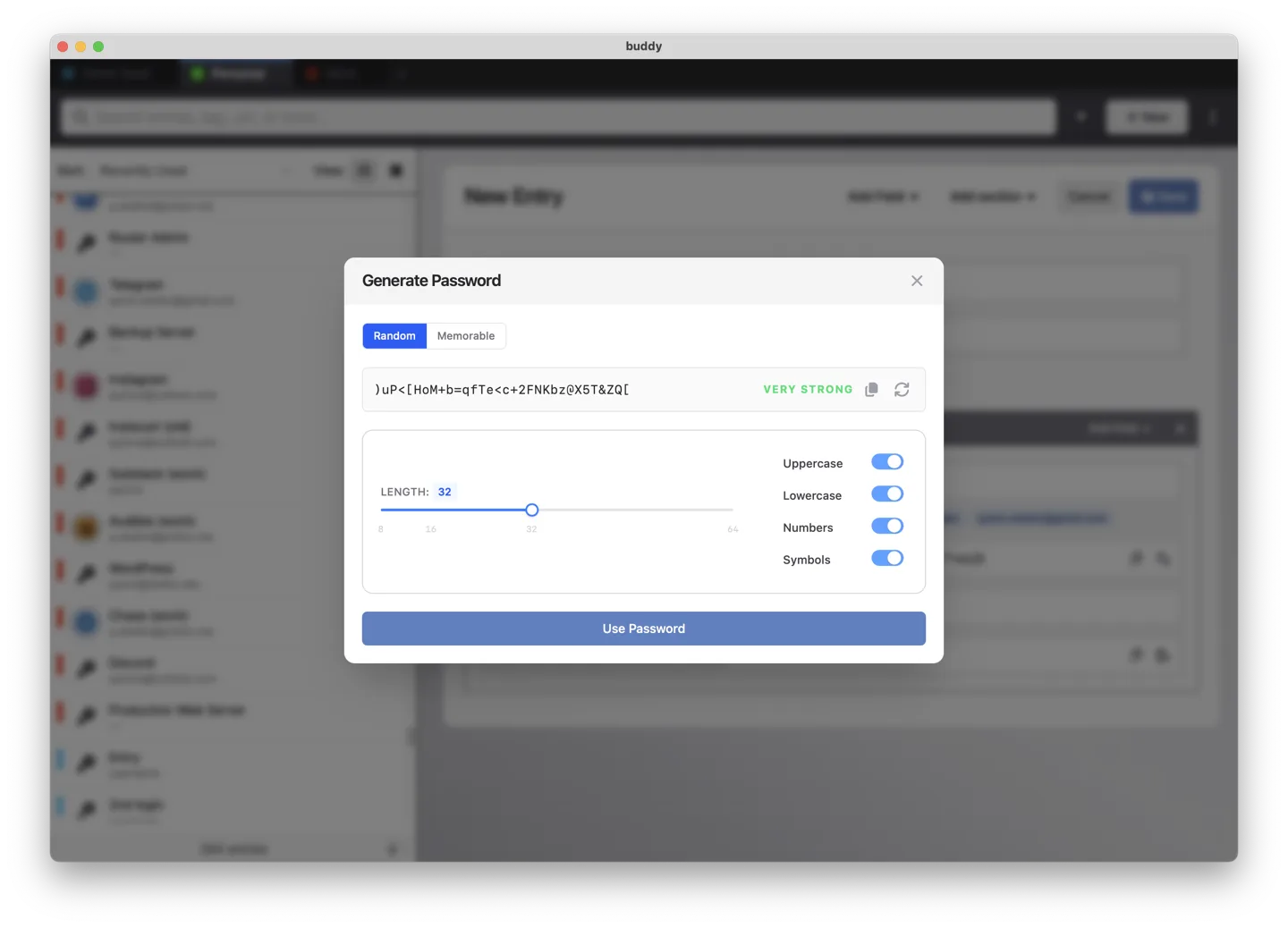
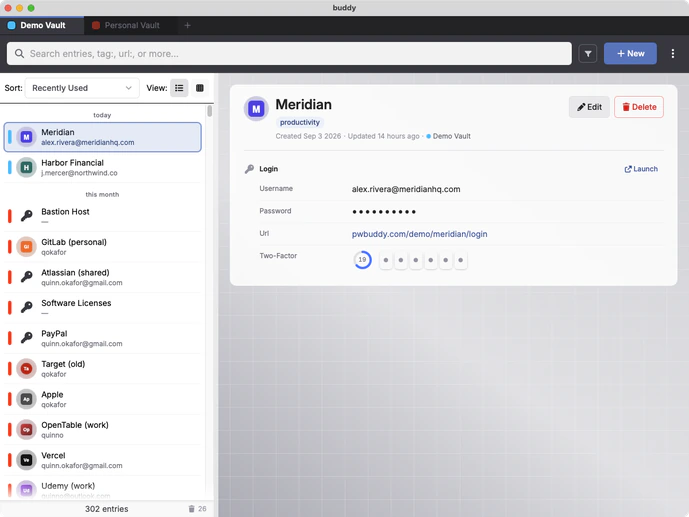
A local-first personal desktop password manager without an annoying subscription. Buy it once, own it for life.

Launching late 2026 · macOS & Windows

Sign up to our waitlist to get notified when Buddy launches. No spam.

Buddy
Search passwords…

Recent

URL

Username

Password

·

Two-factor

••• •••

Cross-platform

macOS & Windows

No subscription

simple one-time purchase

Works offline

we respect your privacy

Fast and lightweight

built in Rust

Why local?

Most password managers keep your vault on their servers. Buddy keeps it on your computer.

Cloud password managers

your vault $36/yr $72/yr $48/yr
One server, everyone's vaults. A giant target for hackers looking for a massive payday.

Buddy

no cloud subscription
Your vault data stays encrypted on your machine and protected by your OS, eliminating cloud breaches as an entire threat vector.

Not just a hypothetical risk

  • 2022 · LastPass An attacker who'd stolen a developer's credentials reached LastPass's cloud storage and copied encrypted customer vault backups.
  • 2021 · Passwordstate A hijacked update mechanism pushed a malicious file that harvested stored credentials from installs that upgraded during a ~28-hour window.
  • 2017 · OneLogin Exposed AWS keys let an attacker reach a database table and potentially decrypt customer data.

Security

Security you can rely on.

Nothing exotic. Nothing proprietary. Buddy uses well-studied, industry-standard cryptography to protect your vault and keeps it where only you can access it.

Strong, modern encryption

Keys are derived using Argon2id and your vault is sealed with XChaCha20-Poly1305. Both are widely used, publicly documented cryptographic standards. Your master password never leaves your machine.

Locks up after itself

Unlock with Touch ID or Windows Hello. Buddy locks when your machine sleeps or goes idle, wipes copied passwords from your clipboard after a few seconds, and keeps passwords and other sensitive data hidden until you reveal them.

Backups you control

Automatic encrypted backups are saved to any folder you choose, including one already synced by your preferred cloud storage service. Restore is built in and validated before it touches your vault.

Never hostage

Export everything, any time, attachments included. Your data stays yours whether or not you stay with us.

Read the full security model →

Features

Everything you'd expect.
Thoughtfully done.

Buddy doesn't reinvent the password manager. It covers the essentials you use every day and gets the details right.

Import & export

Import from over 12 popular password manager formats with ease. Switching is simple, and your data always stays under your control.

  • 1Password — 1pux, CSV
  • Keeper — JSON, CSV
  • Bitwarden — JSON, CSV
  • Buddy — JSON, CSV
  • LastPass — CSV
  • Chrome — CSV
  • Firefox — CSV
  • Safari — CSV
  • Import any other CSV with configurable field mapping

Export anytime too, no lock-in — full-fidelity JSON with attachments and complete entry data, or CSV for simple portability elsewhere.

More on import & export →

Take the full feature tour →

Switching

Bring everything with you.

Your current manager already lets you export your data. Buddy takes it from there.

1

Export from your old manager

Buddy can import from any CSV format, and supports several other third-party formats as well.

2

Drop the file on Buddy

The format is detected automatically. Preview changes before they're committed. Logins, two-factor secrets, and notes land in the right fields.

3

Cancel the subscription

That's it. And if you ever leave Buddy, export is one click.

Is Buddy for you?

Buddy is a great fit if you:

  • Want a simple, comprehensive password manager for personal use
  • Are tired of recurring subscription fees
  • Primarily use one device, or are comfortable syncing manually between a few devices
  • Spend most of your time on desktop

Buddy may not be the right fit if you need:

  • Automatic syncing across devices
  • Password sharing for families, teams, or organizations
  • Passkey or hardware security key support

Pricing

Buy it once. Own it for life.

Most password managers charge $36-60 every year.
Buddy is $49 once. Yours to keep forever.

Trial

Free

30 days, full access

  • macOS & Windows
  • No account required
  • All features unlocked

Perpetual license

$49

One-time payment

  • No expiration date
  • All your personal devices
  • Product support
  • All minor & patch updates for 1.x
  • Discounted major upgrades

FAQ

Frequently Asked Questions

Is Buddy really a one-time purchase?

Yes. Buddy is $49 once — no subscription, no recurring payments. You'll receive a license key voucher you can redeem on a generous number of your own devices; if you ever run out of room, just ask and we'll raise it. This pricing model works for us because we don't have a large cloud compute bill to pay every month.

Your purchase includes support and updates for the current major version. Future major upgrades, if released, are optional.

Do I need to create an account?

No. If you decide to purchase Buddy, we'll need your email address for order processing, but creating an account is optional. You only need a valid license key to activate each installation of Buddy. No sign-in required.

What happens if I buy now and you release a new version?

Version 2.x isn't officially even on the roadmap yet. We're primarily interested in supporting and improving 1.x for the time being.

What happens if Buddy shuts down?

Your vault is still yours.

Buddy stores your passwords locally, not on a company server, and doesn't require an internet connection for ongoing use. License keys are opaque cryptographic tokens that are validated offline. You can export your data at any time, so your passwords aren't locked into a service.

Even with zero future revenue, we are currently bootstrapped until 2031.

What if I forget my master password?

Your master password cannot be recovered by us — or anyone else.

That's what keeps your vault private. We recommend storing it somewhere safe, and using Touch ID (or Windows Hello) features for everyday access where available.

Can I move my passwords from another password manager?

Yes. Buddy supports importing your existing passwords so you can switch without starting over.

What browsers and devices does Buddy support?

Buddy supports macOS and Windows, with browser extensions for Chrome and Firefox to support autofill. We are hoping to expand this list going forward.

What if I need help, or have a different question?

Feel free to contact us! Support goes directly to the people building Buddy — no chatbot maze, no outsourced ticket system.
Own your passwords again.

Buddy launches in late 2026 for macOS and Windows. Be the first to know.

Sign up to our waitlist to get notified when Buddy launches. No spam.